Halloween Brush Stamp for Procreate: The Ultimate Digital Art Resource
As the autumn season approaches, digital artists and hobbyists alike begin searching for ways to infuse their creative projects with spooky charm and festive energy. Whether you are designing a digital greeting card, planning a social media campaign, or simply enjoying a scrapbooking session on your iPad, the right tools can make all the difference. This is where the Halloween Brush Stamp for Procreate becomes an essential asset in your digital toolkit. Designed specifically for the Procreate application, this resource offers a streamlined solution for adding intricate Halloween imagery without the need for complex drawing skills.
Solving the Challenge of Time-Consuming Illustration
One of the most significant hurdles digital artists face during peak seasonal periods is time management. Creating detailed illustrations from scratch—such as jack-o'-lanterns, ghosts, bats, and witches—requires patience and technical skill. For many adults balancing work, family, and creative hobbies, spending hours perfecting a single vector outline is often impractical. The goal is usually to produce high-quality visuals quickly while maintaining a professional aesthetic.
The Halloween Brush Stamp for Procreate addresses this challenge directly. Instead of struggling to draw every curve of a spiderweb or the jagged edges of a tombstone, users can access a pre-made library of hand-drawn designs. These stamps act as instant building blocks, allowing creators to focus on composition and color rather than getting bogged down in the minutiae of line work. By reducing the time spent on repetitive drawing tasks, artists can increase their output and enjoy the creative process more fully.
Understanding the Product and Its Capabilities
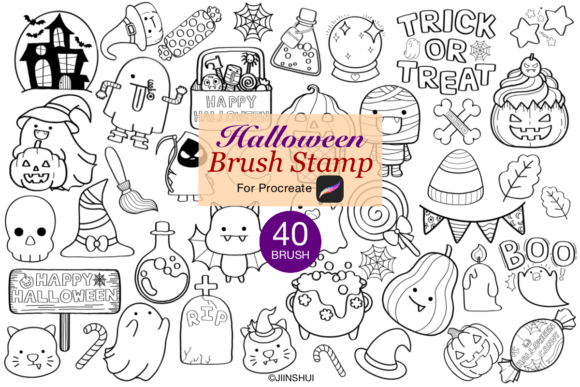
This specific brush set is not just a collection of images; it is a functional tool designed to integrate seamlessly into the Procreate workflow. When you download the Halloween Brush Stamp for Procreate, you receive a compressed zip file containing 40 unique Halloween brush stamps within a single brush set. What makes these brushes particularly versatile is their design philosophy. They are created as black outlines, which serves as a neutral canvas for your imagination.
Because the base design is a simple outline, you have complete control over the final look. You can change the stroke color to match any palette, from traditional orange and black to pastel pinks and purples for a "candy corn" aesthetic. The hand-drawn nature of the designs ensures that they possess a warm, organic feel that generic clip art often lacks. This balance between structure and flexibility allows for endless customization, making each project feel unique even when using the same underlying assets.
Step-by-Step Implementation Guide
Getting started with these digital assets is straightforward, provided you follow the correct import procedure. Proper installation ensures that the brushes function correctly within your app. Here is how to successfully add the Halloween Brush Stamp for Procreate to your device:
- Download the File: Begin by downloading the zip file to your iPad. It is crucial to keep the file intact until the next step.
- Unzip the Archive: Open the folder on your device and unzip the file. Attempting to import a zipped file directly will not work; the files must be extracted first.
- Open in Procreate: Locate the unzipped brush file, tap the "Share" menu, and select the option to "Open in Procreate."
- Verify Installation: Once opened, the new brush set will automatically appear in your Procreate Brush Library. You can now navigate to the set and see all 40 available stamps.
- Start Creating: Select a stamp, tap your screen to place it, and then use the transformation tools to resize, rotate, or adjust the opacity to fit your design perfectly.
This seamless integration means there is no learning curve regarding software compatibility. As long as you are using the Procreate application on your iPad, the process is intuitive and efficient.
Practical Applications for Diverse Projects
The versatility of the Halloween Brush Stamp for Procreate extends far beyond simple doodling. These tools are engineered to support a wide range of practical applications, catering to both personal enjoyment and commercial endeavors.
Digital Greetings and Invitations
Creating custom invitations for a Halloween party or sending digital e-cards to friends has never been easier. With 40 distinct designs, you can mix and match elements to create cohesive themes. Imagine an invitation featuring a haunted house background with floating ghosts and bats added via stamps. The ability to change the outline color allows you to match the typography and overall branding of your event instantly.
Commercial Design and Branding
For graphic designers and content creators, these brushes offer a legal and ethical way to enhance commercial art. You are permitted to use these stamps in your own graphics, websites, blogs, and printable projects for clients. Whether you are designing a logo for a local bakery's pumpkin spice promotion or creating social media banners for a retail store, these assets provide a professional touch without the copyright risks associated with unlicensed stock photos.
Personalized Stationery and Decor
Beyond digital screens, these designs translate beautifully to print. Artists can create custom wallpapers for their devices, design stickers for planners, or produce scrapbook layouts for their children's memories. The hand-drawn quality adds a personal sentiment that mass-produced decorations lack. Even quick design projects, such as last-minute holiday decorations for a classroom or office, can be elevated with these ready-to-use elements.
Tailoring the Experience to Your Needs
Different users will approach the Halloween Brush Stamp for Procreate based on their specific goals. A professional illustrator might use the stamps as base layers, scanning them into other software later or using them to speed up the initial sketching phase before adding texture and shading. In contrast, a hobbyist might use them as standalone elements to decorate digital journals or plan party supplies.
It is important to note the limitations to ensure a smooth experience. These stamp brushes are exclusively designed for the Procreate application. They will not function in Photoshop, Clip Studio Paint, or other desktop-based software. Furthermore, while you can sell the art you create using these stamps, you cannot resell the brush set itself. This restriction protects the intellectual property of the creator, Jiinshui Shop, while granting you full freedom to monetize your own finished designs.
Final Thoughts on Creative Efficiency
In the fast-paced world of digital creation, having reliable resources is key to success. The Halloween Brush Stamp for Procreate represents a thoughtful solution for those seeking to enhance their seasonal projects without sacrificing quality or time. By offering 40 hand-drawn, customizable, and watermark-free designs, this tool empowers artists to bring their spooky visions to life with ease.
Whether you are a seasoned professional looking to streamline your workflow or an enthusiast eager to try your hand at digital scrapbooking, these brushes provide the foundation for creativity. Download the file, import it into Procreate, and let your imagination take flight this October. With the right tools at your fingertips, the only limit to your Halloween creations is your own creativity.