Retro Cartoon Procreate Brush Stamp
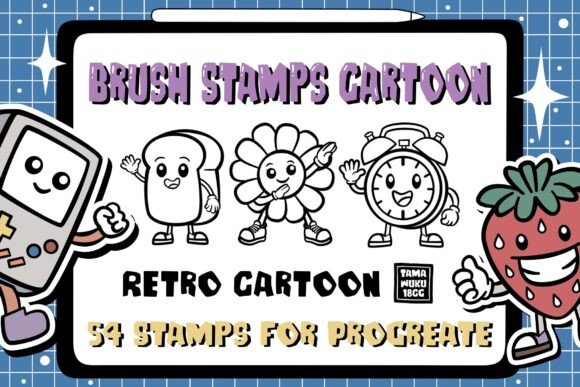
In the digital design landscape, speed and style often compete for attention. The Retro Cartoon Procreate Brush Stamp set bridges this gap by offering a curated collection of 54 instant stamps designed to accelerate your workflow while infusing your projects with nostalgic charm. This tool is not merely a collection of images; it is a strategic asset for creators who value efficiency without sacrificing artistic integrity. Whether you are crafting social media graphics, designing merchandise, or illustrating children's books, these brushes provide a consistent, high-quality aesthetic that would otherwise require hours of manual drawing.
The Efficiency of Instant Digital Stamping
One of the primary challenges in digital illustration is the time investment required to create repetitive elements. Drawing the same character pose, background texture, or decorative icon multiple times can stall momentum. The Retro Cartoon Procreate Brush Stamp solves this by allowing you to place complex, hand-drawn elements with a single tap of your Apple Pencil. This "instant brush" functionality transforms the creative process from a labor-intensive task into a dynamic assembly line.
By utilizing pre-made stamps, you gain the ability to iterate quickly. You can test different compositions, swap out characters, or adjust patterns in seconds rather than minutes. This efficiency is particularly valuable for freelancers and small business owners who must balance creative output with tight deadlines. The set includes 54 distinct stamps, ensuring you have enough variety to avoid visual monotony while maintaining a cohesive retro theme across your work.
Unlocking Creative Possibilities
The versatility of this brush set extends far beyond simple illustration. Because the stamps are designed within the Procreate ecosystem, they interact naturally with layers, blending modes, and opacity settings. This opens up a wide array of creative possibilities:
- Pattern Design: Create seamless textures for fabric, wallpaper, or digital backgrounds by repeating stamps in varied arrangements. The retro aesthetic pairs exceptionally well with bold color palettes, making it ideal for fashion textiles or stationery.
- Greeting Cards and Invitations: Assemble unique card designs by combining character stamps with text and background elements. The playful nature of the retro cartoon style makes these perfect for birthdays, holidays, or event invitations.
- Social Media Content: Marketers and bloggers can use these stamps to create eye-catching headers, story graphics, and promotional posts that stand out in crowded feeds.
- Merchandise Mockups: Entrepreneurs can rapidly prototype t-shirt designs, tote bags, and stickers before committing to production costs.
Adapting the Style for Different Audiences
While the core aesthetic is rooted in retro cartoons, the application of these stamps can be tailored to suit diverse audiences and contexts. For educators creating classroom materials, the friendly, vintage characters can make learning resources more engaging for students. For designers targeting a millennial or Gen Z audience, the nostalgia factor serves as a powerful emotional hook, connecting modern digital products with the warmth of mid-century animation.
To maintain originality when using stamp sets, consider altering the scale, rotation, and color of individual elements. Do not rely on the default placement alone. Rotate a character stamp to change its perspective, or apply a gradient overlay to unify disparate elements into a single scene. By manipulating the properties of the stamps, you ensure that your final output feels custom-crafted rather than templated. This approach respects the audience's intelligence and delivers a polished, professional result.
Maintaining Consistency and Clarity
When working with a large library of 54 stamps, organization is key to a smooth workflow. It is easy to become overwhelmed by choices, which can lead to inconsistent designs. To keep your results clear and effective, establish a limited color palette before you begin. Select three to four primary colors that define your project's mood and stick to them across all stamped elements. This creates visual harmony even when the shapes and sizes vary significantly.
Furthermore, pay attention to the hierarchy of your composition. Use larger stamps for focal points and smaller ones for texture or background details. Avoid cluttering the canvas; negative space is just as important as the stamped elements themselves. A well-balanced composition guides the viewer's eye naturally, ensuring your message or design intent is communicated clearly.
Technical Requirements and Installation
To utilize the full potential of the Retro Cartoon Procreate Brush Stamp, specific hardware and software requirements must be met. These brushes are optimized for the Procreate application on iPad devices. Ensure you have an iPad Pro or any standard iPad model compatible with Procreate Version 5.0 or higher. Additionally, an Apple Pencil or a pressure-sensitive stylus is required to take full advantage of the brush dynamics, although stamp brushes primarily rely on touch placement.
Installation is straightforward and designed to save you time immediately upon download. Follow these steps to integrate the brush set into your workspace:
- Download the ZIP file containing the brush set to your device.
- Unzip the file to reveal the
.brushsetfile. - Tap the file and select "Open In Procreate."
- The application will automatically install the set. Navigate to the Brush Library to access your new 54 stamps.
It is important to note that these brushes are exclusive to the Procreate application. They will not function in other graphic design software such as Photoshop or Illustrator. This exclusivity ensures that the brush dynamics and performance remain optimized for the iPad environment, providing a lag-free experience even with complex layers.
Practical Recommendations for Creators
For those looking to maximize the value of this resource, consider building a personal library of variations. Once installed, duplicate the stamp brushes and experiment with different flow settings, jitter, or color dynamics. While the base stamp provides the shape, tweaking the brush engine allows you to adapt the texture to match specific project needs. For example, increasing the scatter might give a hand-scattered confetti look, while adjusting the size variance can create depth in a crowd scene.
Additionally, use these stamps as a starting point for further illustration. Place a character stamp down, then switch to a traditional pencil brush to add shading, highlights, or accessories. This hybrid approach combines the speed of stamping with the detail of freehand drawing, resulting in unique assets that retain the retro vibe but offer a fresh, personalized touch.
Final Thoughts on Digital Creativity
The Retro Cartoon Procreate Brush Stamp set represents more than just a convenience; it is a catalyst for creativity. By removing the friction of repetitive drawing tasks, it empowers creators to focus on composition, storytelling, and design strategy. Whether you are a seasoned professional or a hobbyist exploring digital art, this tool offers a reliable way to produce high-quality, nostalgic visuals efficiently. Embrace the blend of speed and style, and let these stamps inspire your next great project.