Hen Brush Stamp Set for Procreate: A Practical Guide to Integration
Digital illustration often requires a balance between custom drawing and efficient asset management. For artists, designers, and content creators working within the iPad ecosystem, the Hen Brush Stamp Set for Procreate offers a specialized solution for incorporating wildlife elements without starting from scratch. This tool is not merely a collection of images; it is a workflow accelerator designed to streamline the creation of nature-inspired graphics, book covers, logos, and social media assets. By understanding how to integrate this specific brush set into your existing creative process, you can maintain high standards of quality while significantly reducing production time.
Understanding the Asset and Its Role in Your Workflow
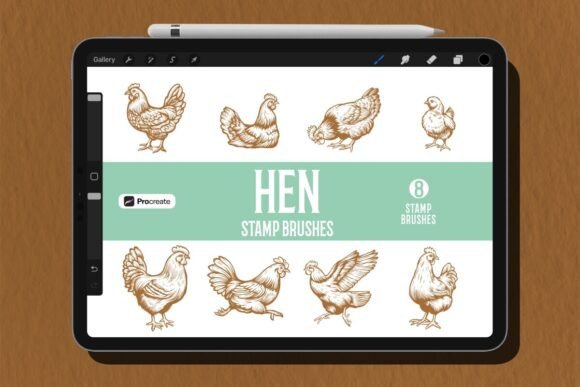
The Hen Brush Stamp Set for Procreate consists of eight distinct, hand-drawn hen silhouettes packaged as a native .brushset file. Unlike standard raster images that must be imported manually, these brushes function directly within Procreate's engine. This distinction is critical for professionals who need to manipulate opacity, blend modes, and layer effects dynamically. The set includes high-resolution stamps that retain crisp edges even when scaled, ensuring that the final output meets print and digital display requirements.
In a broader design process, this asset fits into the "asset gathering" and "composition" phases. Before opening a new canvas, creators often define their visual theme. If the project involves rustic aesthetics, farm-to-table branding, or mystical nature themes, these silhouettes serve as foundational elements. They allow you to bypass the labor-intensive task of vectorizing or tracing bird shapes, freeing up mental energy for color theory, layout, and storytelling.
Preparation and Compatibility Checks
Successful integration begins with proper preparation. Ensure your Procreate app is updated to a version compatible with modern brush sets. While most recent versions support complex stamp brushes, older installations may struggle with specific texture mappings. Upon downloading the package, you will typically find three components: the .brushset file, a JPG preview image, and a Read Me.pdf document.
The Read Me.pdf is essential for verifying installation instructions and licensing terms. Professionals should review this immediately to understand usage rights, particularly if the work is intended for commercial projects like book covers or client logos. Once verified, import the .brushset file by tapping it directly from the Files app on your iPad. This action automatically adds the Hen figures to your Procreate brush library under a dedicated category, keeping your workspace organized.
Implementation Strategies During the Creative Process
Once installed, the Hen Brush Stamp Set for Procreate becomes an active part of your drawing toolkit. The primary advantage lies in its versatility during the composition stage. Instead of drawing a silhouette from scratch, you can tap the canvas to place a figure instantly. However, true efficiency comes from how you manipulate these stamps after placement.
Dynamic Scaling and Rotation: One of the most powerful features of Procreate stamps is the ability to resize and rotate them immediately after application using the transform tool. This allows you to create dynamic compositions where hens appear at different distances or angles, adding depth to a flat illustration. For example, placing a large, detailed silhouette in the foreground and smaller, faded ones in the background creates a sense of atmospheric perspective without requiring multiple drawing sessions.
Layering and Blending: To achieve a cohesive look, avoid leaving the stamps as stark black shapes. Adjust the layer blending modes to "Multiply," "Overlay," or "Soft Light" depending on your background. If your background is a textured watercolor wash, setting the hen silhouette to "Multiply" will allow the paper grain to show through, integrating the stamp naturally into the environment. You can also lower the opacity of specific layers to suggest distance or shadow, turning a simple stamp into a nuanced element of the scene.
Masking and Clipping: For advanced workflows, use clipping masks to apply textures or colors strictly to the hen silhouettes. This technique is particularly useful for creating stylized illustrations where the bird shape needs to contain a pattern, such as feathers made of leaves or abstract geometric shapes. By masking the stamp, you ensure that any subsequent painting stays contained within the silhouette's boundaries, maintaining clean lines and professional results.
Use Cases Across Different Professional Scenarios
The utility of the Hen Brush Stamp Set for Procreate extends beyond personal art projects. It addresses specific needs across various industries, offering a practical resource for entrepreneurs and freelancers alike.
- Book Cover Design: Authors and illustrators often need evocative imagery that conveys mood quickly. These silhouettes are ideal for fantasy or historical fiction covers where a rural or mystical atmosphere is required. The high resolution ensures they remain sharp when printed on hardcovers.
- Brand Identity and Logos: Small business owners in the organic food, artisanal farming, or pet care sectors can use these stamps as a base for logo concepts. By combining the hen silhouette with typography and other graphic elements, a unique brand mark can be developed rapidly.
- Social Media Graphics: Content creators and marketers require consistent visual themes for Instagram, Pinterest, or blogs. Using the same set of hen silhouettes across multiple posts establishes visual consistency, reinforcing brand recognition without the need for repetitive drawing.
- Textile and Surface Pattern Design: Designers creating patterns for fabric, wallpaper, or wrapping paper can duplicate and arrange these stamps to create seamless repeats. The hand-drawn nature of the silhouettes adds an organic touch that synthetic vectors often lack.
Optimizing Efficiency and Quality Control
To maximize the value of this asset, consider how it interacts with other tools and methods in your pipeline. Organization is key. Create a dedicated folder in Procreate for projects utilizing this set, storing your working files, the original JPG preview, and any exported variations together. This practice ensures that if a client requests a revision months later, you have immediate access to the source assets.
Quality control involves checking the output at different scales. While the stamps are high-resolution, always export a test version at 300 DPI for print projects to confirm that no pixelation occurs at the edges of the silhouettes. Additionally, consider color correction. Since the stamps are likely monochromatic by default, experiment with Procreate's adjustment tools to tint them to match your palette before finalizing the artwork. This step ensures the asset feels custom-made rather than pasted on.
Long-term usability depends on how well you adapt the asset to evolving trends. While the core silhouette remains static, the way you style it—through lighting, texture overlays, and color grading—can keep your designs fresh. Treat the Hen Brush Stamp Set for Procreate as a modular component rather than a finished product. By mastering the techniques of scaling, blending, and masking, you transform a simple download into a versatile instrument for professional-grade creativity.
Final Thoughts on Integration
Incorporating the Hen Brush Stamp Set for Procreate into your workflow represents a strategic decision to prioritize efficiency without sacrificing artistic integrity. It bridges the gap between the desire for custom, hand-crafted details and the practical constraints of deadlines and budgets. Whether you are a hobbyist exploring digital art or a professional delivering commercial assets, understanding the mechanics of these brushes allows you to execute your vision with precision. By planning your integration, testing compatibility, and applying advanced manipulation techniques, you ensure that every project benefits from the untamed beauty of these digital silhouettes.