✨ Procreate Star Brush Set
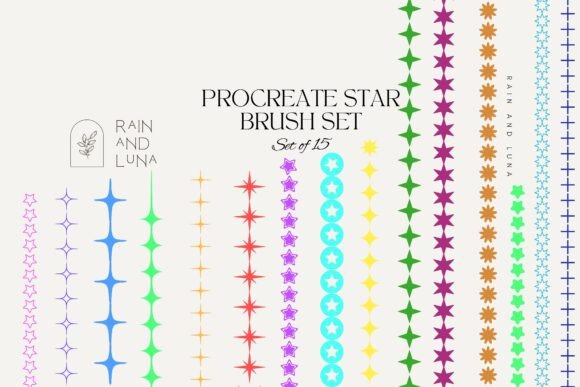
Digital art often thrives on the details that transform a flat illustration into a living, breathing world. For artists working on celestial themes, fantasy landscapes, or dreamy textures, the ability to render light and sparkle efficiently is crucial. The Procreate Star Brush Set addresses this specific need by offering a curated collection of tools designed to replicate the complexity of starlight without the tedious manual labor. Featuring 15 unique variations, this set ranges from fine, scattered stardust to glowing, nebulous constellations, allowing creators to build atmospheric depth with just a few strokes.
Understanding the Tool: More Than Just Shapes
At its core, the Procreate Star Brush Set is a digital asset compatible with the Procreate application on iPad. Unlike standard shape stamps, these brushes are engineered with dynamic settings that respond to pressure, tilt, and opacity. This means a single brush can create a dense cluster of stars in one area and a sparse scattering in another, simply by varying how hard you press on the Apple Pencil. The inclusion of 15 distinct brushes ensures that no two celestial scenes look identical; one might offer sharp, geometric points for a sci-fi aesthetic, while another provides soft, diffused glows perfect for a romantic night sky.
The value of such a set lies in its versatility. It bridges the gap between technical precision and organic randomness. In traditional media, creating a convincing starry sky requires hours of stippling with white gel pens or dry brushing with acrylics. Digitally, it can take minutes if you have the right toolset. This efficiency does not compromise quality; instead, it frees up mental energy for composition and color theory, allowing the artist to focus on the broader narrative of their piece.
Why Different Audiences Value Celestial Tools
The utility of the Procreate Star Brush Set shifts depending on who is using it and what they aim to achieve. While the physical product remains the same—a downloadable file containing 15 brushes—the application and priority change across different user groups.
For Beginners and Hobbyists
Newcomers to digital art often struggle with the concept of layering and texture. A common hurdle is making elements look "real" rather than pasted on. For a beginner, this set serves as an educational tool. By experimenting with the pre-configured settings, they learn how opacity flows and how scatter effects work without needing to dive deep into complex brush engine settings immediately.
A hobbyist journaling their dreams or sketching nightly routines might use the softer, glowing brushes to add a whimsical touch to their pages. The priority here is ease of use and immediate visual gratification. They are less concerned with commercial licensing and more focused on how quickly they can make their personal projects feel magical and polished.
For Professional Illustrators and Freelancers
For professionals, time is currency. An illustrator working on a children's book cover or a fantasy novel needs to deliver high-quality assets within tight deadlines. The Procreate Star Brush Set offers a significant speed advantage. Instead of manually painting hundreds of individual stars, a professional can lay down a base layer of atmosphere and then use the specific brushes to highlight focal points, such as a wizard's spell or a distant galaxy.
Professionals also evaluate these tools based on flexibility and reliability. They need to know that the brushes will behave consistently across different canvas sizes and resolutions. The variety in the set allows them to maintain a consistent style across a series of illustrations while avoiding the "repetitive pattern" look that cheap clip art often suffers from. Their priority is workflow optimization and the ability to customize the final output to match client specifications.
For Educators and Content Creators
Art educators often look for resources that can simplify complex concepts for students. Using a dedicated star brush set allows teachers to demonstrate techniques like atmospheric perspective—how objects fade into the distance—or light diffusion. It becomes a practical example of how digital tools can mimic natural phenomena.
Content creators and bloggers who produce tutorials or social media graphics rely on visual appeal to capture attention. A video tutorial on "How to Paint a Night Sky" becomes significantly more engaging when the creator uses specialized brushes that yield instant results. For this group, the presentation and the "wow factor" of the final image are paramount. They may also consider the long-term usefulness of the brushes for future content series, ensuring the investment pays off over multiple projects.
For Small Business Owners and Marketers
Entrepreneurs running print-on-demand shops, stationery brands, or digital product lines need assets that translate well into merchandise. The Procreate Star Brush Set can be used to create unique patterns for fabric, wallpaper, or greeting cards. For a business owner, the evaluation focuses on the commercial viability and uniqueness of the designs generated.
They might use the brushes to create a cohesive brand identity centered around magic, space, or dreams. The cost-effectiveness of a single download that generates dozens of unique design variations makes it an attractive option for small businesses with limited budgets for custom illustration services. Reliability is key here; the brushes must produce clean lines and high-resolution outputs suitable for printing.
Evaluating Your Needs: Is This Set Right for You?
Determining whether the Procreate Star Brush Set aligns with your goals requires a honest assessment of your current workflow and project types. If you frequently find yourself spending excessive time on background details, this tool could streamline your process. However, if your work is strictly minimalist or relies on vector-based geometry, raster brushes might not integrate seamlessly into your pipeline.
Consider your skill level. If you are comfortable navigating the Procreate interface and understand basic layer management, you will get the most out of these brushes. They are not "magic wands" that draw the picture for you; they are advanced tools that require a steady hand and an eye for composition to utilize effectively. Conversely, if you are looking to expand your creative repertoire without learning complex node-based rendering systems, this set offers a gentle yet powerful entry point into advanced texturing.
Think about the specific aesthetic you are chasing. Do you need the crisp, sharp definition of a constellation map, or the soft, ethereal glow of a nebula? With 15 unique options, the set covers a broad spectrum, but it is essential to review the preview images to ensure the style matches your vision. Some brushes lean towards realism, while others embrace a stylized, cartoonish approach. Matching the brush style to your overall artistic direction is critical for a cohesive final piece.
Practical Application in Real Projects
Imagine a scenario where a freelance designer is creating a logo for a new astrology app. They need a symbol that feels modern yet mystical. By selecting a brush from the Procreate Star Brush Set that offers a subtle gradient glow, they can create a central star that appears to emit light, adding depth to a flat vector logo. This adds a layer of sophistication that simple shapes cannot achieve.
In another context, a teacher preparing a lesson plan on the solar system might use the scattered stardust brushes to help students visualize the density of the universe. The visual aid becomes more immersive, helping students grasp abstract concepts through tactile, interactive drawing.
Ultimately, the Procreate Star Brush Set is more than a collection of digital files; it is a catalyst for creativity. Whether you are a seasoned pro looking to cut production time or a curious beginner wanting to add a sprinkle of magic to your sketches, the right tools can make all the difference. By understanding how these brushes function and evaluating your own priorities regarding speed, quality, and style, you can decide if this resource is the missing piece in your creative toolkit.