Procreate Photoshop Fashion Brush: A Practical Guide to Efficient Design
Fashion illustration has evolved from traditional charcoal and ink to digital precision, yet the core challenge remains the same: capturing the fluidity of fabric and the elegance of the human form. For designers, students, and hobbyists alike, the Procreate Photoshop Fashion Brush represents a significant leap forward in workflow efficiency. These tools are not merely decorative; they are functional assets designed to streamline the creation process, allowing you to focus on creativity rather than repetitive technical drawing.
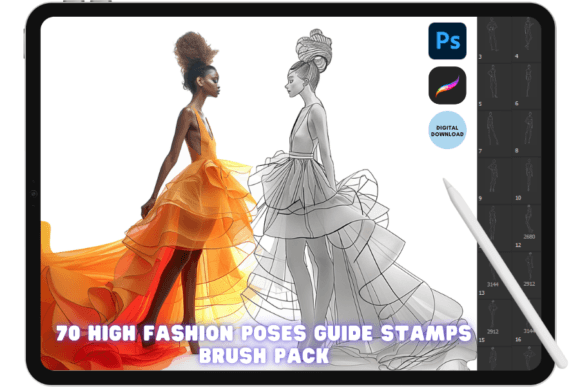
The specific set known as the "100 Procreate Photoshop Fashion Figure Line Art Stamp Brush Set" is particularly notable for its "stamp and color" capability. This approach fundamentally changes how one approaches figure drawing. Instead of spending hours perfecting anatomy with every new sketch, you can place a pre-crafted line art stamp and immediately begin applying textures, shading, and fashion details. However, like any powerful tool, its value depends entirely on how it is implemented. Misunderstanding the installation process or the artistic intent behind these stamps can lead to frustration rather than productivity.
Understanding the Value of Digital Stamps
Before diving into technical setup, it is crucial to understand what makes a Procreate Photoshop Fashion Brush distinct from standard brushes. Standard brushes require constant hand movement to create lines, curves, and shapes. In contrast, the stamp brushes in this collection are meticulously crafted unique figures. Each stamp serves as a complete line art foundation.
Many creators mistakenly view these stamps as a shortcut that compromises quality. This is a common misconception. When used correctly, these stamps provide a consistent anatomical base that allows the artist to experiment with complex clothing designs, patterns, and lighting without worrying about structural errors. The real value lies in speed and consistency, which are essential for professionals managing tight deadlines or entrepreneurs building a cohesive brand aesthetic.
Common Pitfalls in Installation and Setup
The most frequent point of failure for users is not the artistic application but the initial installation. Because this product is an instant digital download, there are no physical manuals or support staff to guide you through the first few minutes. If the files are not imported correctly, the brushes will simply not appear in your library, leading many to believe the product is defective.
The iPad and Procreate Mistake
A typical error occurs when users attempt to open the downloaded file directly in their file manager without selecting the correct app. The file usually arrives as a .brushset. To ensure success, you must open the link provided after purchase directly on your iPad. Once the file downloads, locate the filename ending in .BRUSHSET. Do not double-tap it blindly. Instead, tap and hold the file, select "Share," and choose Open With Procreate. This action triggers the automatic loading of the entire library into your app. Skipping the "Open With" step often results in the file being saved as a generic data file that Procreate cannot recognize.
The Photoshop Workflow Error
For desktop users working in Adobe Photoshop, the process is equally specific. The file format here is .abr. A common mistake is trying to import these via the File menu or expecting them to load automatically upon opening Photoshop. The correct method requires you to click and drag the .abr file directly into the active Photoshop window. Alternatively, you can use the Brush Settings panel to import, but dragging the file is the most reliable method to ensure all 100 stamps register correctly within your brush preset picker.
Artistic Application: Avoiding the "Copy-Paste" Trap
Once installed, the temptation is to use these stamps exactly as they are, resulting in illustrations that look identical or overly rigid. This is the second major hurdle. While the 100 Procreate Photoshop Fashion Figure Line Art Stamp Brush Set offers detailed line art, relying on them without modification can make your work look amateurish or mass-produced.
To avoid this, treat the stamp as a starting point, not the final image. After stamping the figure, use your standard brushes to:
- Adjust the pose slightly by warping or liquifying elements to fit your composition.
- Add custom clothing details that reflect current trends.
- Vary the line weight to create depth and shadow, ensuring the stamp blends seamlessly with your hand-drawn elements.
- Color over the line art using clipping masks to maintain clean edges while exploring different palettes.
This approach ensures that while you benefit from the time-saving aspect of the stamp, the final output retains a personal, bespoke touch. The goal is to enhance your creative voice, not replace it.
Evaluating Your Needs Before Purchase
Before deciding to invest in a digital asset like the Procreate Photoshop Fashion Brush, it is wise to assess your specific workflow. Not every designer needs a stamp set. If your primary focus is realistic portraiture or highly abstract conceptual art, these figure-specific tools may not align with your goals. They are best suited for:
- Fashion Illustrators: Who need to present multiple outfit variations on similar poses quickly.
- Pattern Designers: Who require consistent figures to showcase repeating textile patterns.
- Content Creators: Who produce social media content and need to maintain a steady output schedule.
- Students: Who are learning anatomy and want to study proportion without the pressure of drawing from scratch every time.
Furthermore, verify your software version. While most modern versions of Procreate and Photoshop support these formats, older versions might lack compatibility with newer brush engine features. Checking your app version before purchasing prevents unnecessary refunds and delays.
Maximizing Efficiency with Digital Downloads
One of the greatest advantages of this product is the instant download nature. There is no shipping wait time, and you receive immediate access to the files. However, this convenience comes with the responsibility of proper file management. It is highly recommended to back up your downloaded .brushset and .abr files immediately. Store them in a dedicated folder on your cloud storage or external drive.
If you ever switch devices or reinstall your operating system, having the original source files means you can reload your brushes instantly without needing to repurchase the product. This simple habit protects your investment and ensures your workflow remains uninterrupted.
Conclusion: A Tool for Growth, Not Replacement
The Procreate Photoshop Fashion Brush set is a powerful resource when understood and applied correctly. By avoiding installation errors and resisting the urge to use stamps without customization, you can significantly elevate the quality and speed of your fashion illustrations. Remember, the technology is there to support your vision, not dictate it. Whether you are a beginner looking to build confidence in figure drawing or a professional seeking to optimize your production pipeline, these tools offer a practical solution to the challenges of digital fashion design. Take the time to learn the mechanics, respect the artistic potential, and let these brushes become an extension of your own creative process.