Monthly Heart Planner Procreate Brush Set: A Practical Guide to Better Tracking
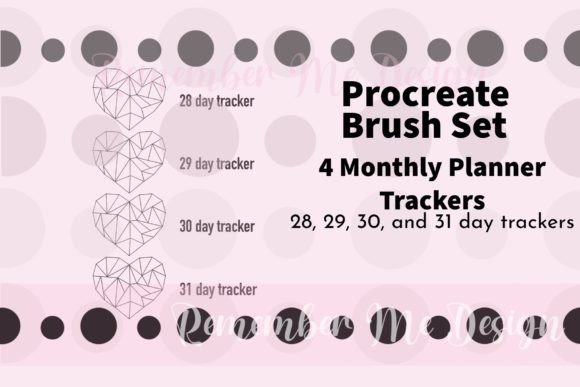
Digital planning has evolved from simple text lists into a visual art form, allowing creators to blend productivity with personal expression. At the heart of this movement lies the Monthly Heart Planner Procreate Brush Set, a specialized tool designed to transform how you visualize your goals. This collection includes four distinct brushes, each calibrated for 28, 29, 30, and 31-day months. The concept is deceptively simple: stamp a row of hearts at the top of your monthly page and color them in as you meet your daily objectives. While the premise is straightforward, the execution often trips up beginners who overlook the nuances of digital asset management and design consistency.
Many users approach digital planning tools with the same mindset they apply to physical stationery—buying everything that looks pretty without considering functionality. This impulse can lead to cluttered workspaces and frustration when the tools do not perform as expected. The Monthly Heart Planner Procreate Brush Set is an excellent resource, but only if integrated correctly into your workflow. Understanding what these brushes are and, more importantly, how to use them effectively, separates a chaotic planner from a streamlined command center for your life.
Understanding the Utility of Specialized Brushes
The primary appeal of this set is its specificity. Unlike generic dot-grid or line brushes, these tools are pre-configured to match the exact calendar lengths of our year. A standard month might have 30 days, while February fluctuates between 28 and 29. Creating these grids manually in Procreate requires tedious alignment and scaling, which wastes valuable time before you even start planning. By utilizing the Monthly Heart Planner Procreate Brush Set, you bypass the setup phase entirely.
These brushes function as stamps. When you tap the canvas, they place a perfectly aligned row of heart outlines. You then use a coloring brush to fill in the hearts as you complete your tasks. This visual feedback loop is powerful; seeing a row of red hearts grow over the month provides a psychological boost that a simple checklist cannot match. Whether you are tracking water intake, workout completion, medication adherence, or creative output, the visual nature of these trackers encourages consistency.
However, the value extends beyond personal use. Designers and content creators often sell digital planner templates or offer custom designs for clients. Having a reliable set of variable-length heart trackers allows professionals to deliver polished, ready-to-use pages without spending hours on layout adjustments. It is a small asset that significantly increases the perceived quality of a larger project.
Common Pitfalls When Choosing Digital Assets
Despite the clear benefits, many users make critical errors when selecting and implementing digital planning tools. The most frequent mistake is assuming all "planner brushes" are created equal. In the vast marketplace of digital assets, sellers often provide low-resolution files or brushes that lack proper spacing. If you download a heart tracker that does not account for screen density or resolution, the result can be pixelated or misaligned when zoomed in.
Another common oversight is ignoring the specific day counts. Some generic sets only offer a 30-day grid. If you attempt to force a 30-day brush onto a 31-day month like January, you are left with an incomplete tracker. Conversely, using a 31-day brush for February creates awkward empty space that disrupts the visual flow of your page. The Monthly Heart Planner Procreate Brush Set solves this by providing the necessary variations, but users must still ensure they select the correct brush for the current month. Failing to do so leads to a disjointed aesthetic and can cause confusion during review periods.
Furthermore, there is a tendency to overcomplicate the coloring process. Beginners often try to use complex blending modes or textured brushes to fill the hearts, resulting in muddy colors or bleeding lines. This not only looks unprofessional but also slows down the daily check-in process. If the act of updating your planner feels like a chore, you are less likely to maintain the habit. Simplicity is key to long-term success in digital planning.
How Poor Choices Impact Efficiency and Satisfaction
The consequences of choosing the wrong tools or using them incorrectly extend beyond mere aesthetics. When a tracker is difficult to use, it becomes a barrier rather than a helper. Imagine trying to plan your month and realizing your brush won't align properly, forcing you to manually adjust layers or delete and restart. This friction drains mental energy and reduces the likelihood that you will stick to your goals.
In a professional context, such as designing planners for clients, these mistakes can damage credibility. A client receiving a template where the heart grid cuts off or overlaps with other elements will question the overall quality of your work. Precision matters. A sloppy layout suggests a lack of attention to detail, which can undermine trust in your services. Additionally, inconsistent file formats can lead to compatibility issues. If a brush set is not optimized for the latest version of Procreate, it may fail to load or behave unpredictably, causing delays in your workflow.
For personal users, the impact is often emotional. We turn to planners to gain control and reduce anxiety. When the tool itself causes frustration, it defeats the purpose. A tracker that is hard to update quickly becomes another source of stress rather than a relief. The goal of the Monthly Heart Planner Procreate Brush Set is to streamline this process, making the act of tracking effortless and satisfying.
Practical Steps for Optimal Usage
To get the most out of these digital assets, a strategic approach is essential. Before purchasing or downloading any brush set, verify the file specifications. Ensure the brushes are compatible with your device's operating system and the current version of Procreate. Look for reviews or previews that demonstrate the brushes in action, paying close attention to how they handle different resolutions.
When setting up your monthly page, take a moment to test the alignment. Stamp the brush on a blank layer first to see how it fits within your existing layout. Adjust the size slider in the brush settings if necessary to ensure the hearts fit neatly above your notes or calendar grid. Remember that you have four options available. Select the brush corresponding to the number of days in the upcoming month. Do not guess; checking the calendar beforehand prevents the need for corrections later.
For coloring, simplicity reigns supreme. Use a solid opacity brush with a clean tip to fill the hearts. Avoid using airbrushes or splatter effects inside the outline unless you have a specific artistic reason, as these can obscure the boundary of the shape. If you want variety, change the color of the stroke rather than the fill technique. This keeps the process fast and ensures the tracker remains legible at a glance.
Evaluating Value Before You Commit
Before integrating the Monthly Heart Planner Procreate Brush Set into your routine, consider your specific needs. Are you looking for a quick fix for a single month, or do you need a comprehensive solution for a year-long project? If you are a designer creating templates for others, investing in a high-quality, versatile set is a wise decision. The time saved on manual alignment translates directly into increased productivity and higher profit margins.
For hobbyists, evaluate whether the style matches your existing planner aesthetic. These heart trackers have a specific charm, but they may not fit a minimalist or industrial design theme. Preview the brushes against your background papers to ensure harmony. Also, consider the learning curve. While these brushes are user-friendly, understanding how to manipulate brush size and opacity takes a little practice. If you are new to Procreate, allocate time to experiment with the settings before applying them to a live planner page.
Finally, remember that the best tool is the one you actually use. The Monthly Heart Planner Procreate Brush Set offers a structured way to track progress, but it requires commitment. By avoiding common pitfalls like mismatched day counts and poor color choices, you can create a planning experience that is both beautiful and functional. With the right preparation and attention to detail, these brushes become more than just digital stamps; they become a reliable companion in achieving your monthly goals.